> ## Documentation Index
> Fetch the complete documentation index at: https://docs.rootly.com/llms.txt
> Use this file to discover all available pages before exploring further.
# Marking Incidents as Duplicate via Slack
> Mark incidents as duplicates from Slack incident channels using the /rootly dup command to consolidate response efforts and avoid scattered chats.
You can mark an incident as a duplicate directly from Slack using a simple slash command. This helps consolidate related incidents quickly and keep responders aligned in a single source of truth.
This operation links the current incident to a **canonical incident** via `duplicate_incident_id`.\
This is separate from **sub-incidents**, which use `parent_incident_id`.
***
## Mark a Duplicate in Slack
In any **incident Slack channel**, type:
```text theme={null}
/rootly dup
```
or
```text theme={null}
/rootly duplicate
```
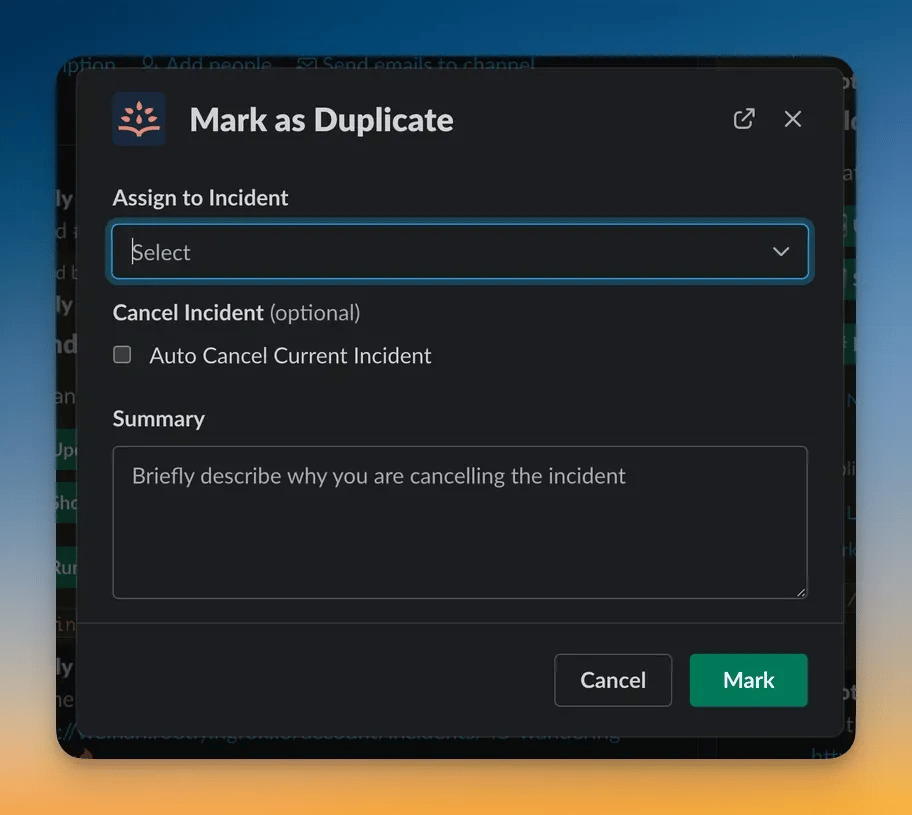
A modal opens allowing you to select the original incident and configure cancellation options.
 ***
## Modal Fields
The Slack modal includes:
Search for the canonical incident.
Optional toggle (on by default).
Optional free text, added to the timeline.
Slack enforces the same permissions as the web interface.\
You must be able to **update** the incident to mark it as a duplicate.
***
## What Happens After Submission
When you confirm the duplicate:
* The current incident is linked to the selected original incident
* A non-editable **timeline entry** is created
* Slack posts a confirmation message in the duplicate’s channel (if applicable)
* If **Auto Cancel** is enabled:
* The duplicate is cancelled
* Alerts attached to the duplicate are resolved automatically
* Slack posts a “Duplicate incident detected” message
Rootly also updates Slack summaries and workflows that rely on incident lifecycle changes.
***
## Best Practices
* **Run the command from the incident channel**\
Slack automatically associates the action with the incident the channel is tied to.
* **Use the canonical incident with the most context**\
Choose the incident that contains the most accurate investigation details or customer-facing messaging.
* **Provide a clear cancellation summary**\
This helps responders understand why context moved and assists retrospectives.
* **Auto-cancel when appropriate**\
This prevents duplicate incidents from remaining open and triggering unnecessary automations.
* **Avoid marking scheduled maintenance as duplicates**\
Slack prevents this automatically, since maintenance incidents follow different lifecycle rules.
***
## Troubleshooting
You must run `/rootly dup` inside a **Rootly incident Slack channel**.\
The command will not work in normal or private Slack channels.
Possible reasons:
* You do not have **update** permissions on the incident
* The incident is a **scheduled maintenance incident** (duplicates are disallowed)
* The incident is **already marked as a duplicate**
Slack only shows incidents you have permission to view.\
Private or restricted incidents may not appear unless you have the required access.
Common causes:
* Auto-cancel was toggled **off**
* The incident was already cancelled
* Slack permissions prevented cancellation
* Workflow or feature flags restricting cancellation were active
This can occur when:
* Slack is not integrated or connected for your team
* The duplicate incident has **no Slack channel**
* Notifications are suppressed by workspace settings
This documentation is built and hosted on [Mintlify](https://mintlify.com), a developer documentation platform.
***
## Modal Fields
The Slack modal includes:
Search for the canonical incident.
Optional toggle (on by default).
Optional free text, added to the timeline.
Slack enforces the same permissions as the web interface.\
You must be able to **update** the incident to mark it as a duplicate.
***
## What Happens After Submission
When you confirm the duplicate:
* The current incident is linked to the selected original incident
* A non-editable **timeline entry** is created
* Slack posts a confirmation message in the duplicate’s channel (if applicable)
* If **Auto Cancel** is enabled:
* The duplicate is cancelled
* Alerts attached to the duplicate are resolved automatically
* Slack posts a “Duplicate incident detected” message
Rootly also updates Slack summaries and workflows that rely on incident lifecycle changes.
***
## Best Practices
* **Run the command from the incident channel**\
Slack automatically associates the action with the incident the channel is tied to.
* **Use the canonical incident with the most context**\
Choose the incident that contains the most accurate investigation details or customer-facing messaging.
* **Provide a clear cancellation summary**\
This helps responders understand why context moved and assists retrospectives.
* **Auto-cancel when appropriate**\
This prevents duplicate incidents from remaining open and triggering unnecessary automations.
* **Avoid marking scheduled maintenance as duplicates**\
Slack prevents this automatically, since maintenance incidents follow different lifecycle rules.
***
## Troubleshooting
You must run `/rootly dup` inside a **Rootly incident Slack channel**.\
The command will not work in normal or private Slack channels.
Possible reasons:
* You do not have **update** permissions on the incident
* The incident is a **scheduled maintenance incident** (duplicates are disallowed)
* The incident is **already marked as a duplicate**
Slack only shows incidents you have permission to view.\
Private or restricted incidents may not appear unless you have the required access.
Common causes:
* Auto-cancel was toggled **off**
* The incident was already cancelled
* Slack permissions prevented cancellation
* Workflow or feature flags restricting cancellation were active
This can occur when:
* Slack is not integrated or connected for your team
* The duplicate incident has **no Slack channel**
* Notifications are suppressed by workspace settings
This documentation is built and hosted on [Mintlify](https://mintlify.com), a developer documentation platform.