> ## Documentation Index
> Fetch the complete documentation index at: https://docs.rootly.com/llms.txt
> Use this file to discover all available pages before exploring further.
# Rootly AI in Slack
> Rootly AI in Slack answers incident questions and acts from your channel with Rootly and connector-specific permission checks.
## Overview
Ask Rootly AI to:
* "This is now a SEV1. Update the incident severity."
* "Draft comms to our high-value customers, letting them know the impact of the incident on their product experience."
* "Page the security team, and convert this to a private incident."
* "Catch me up. What's still open, and who owns it?"
Rootly AI in Slack brings the parts of Rootly you reach for during an incident into the channel where your team already operates.
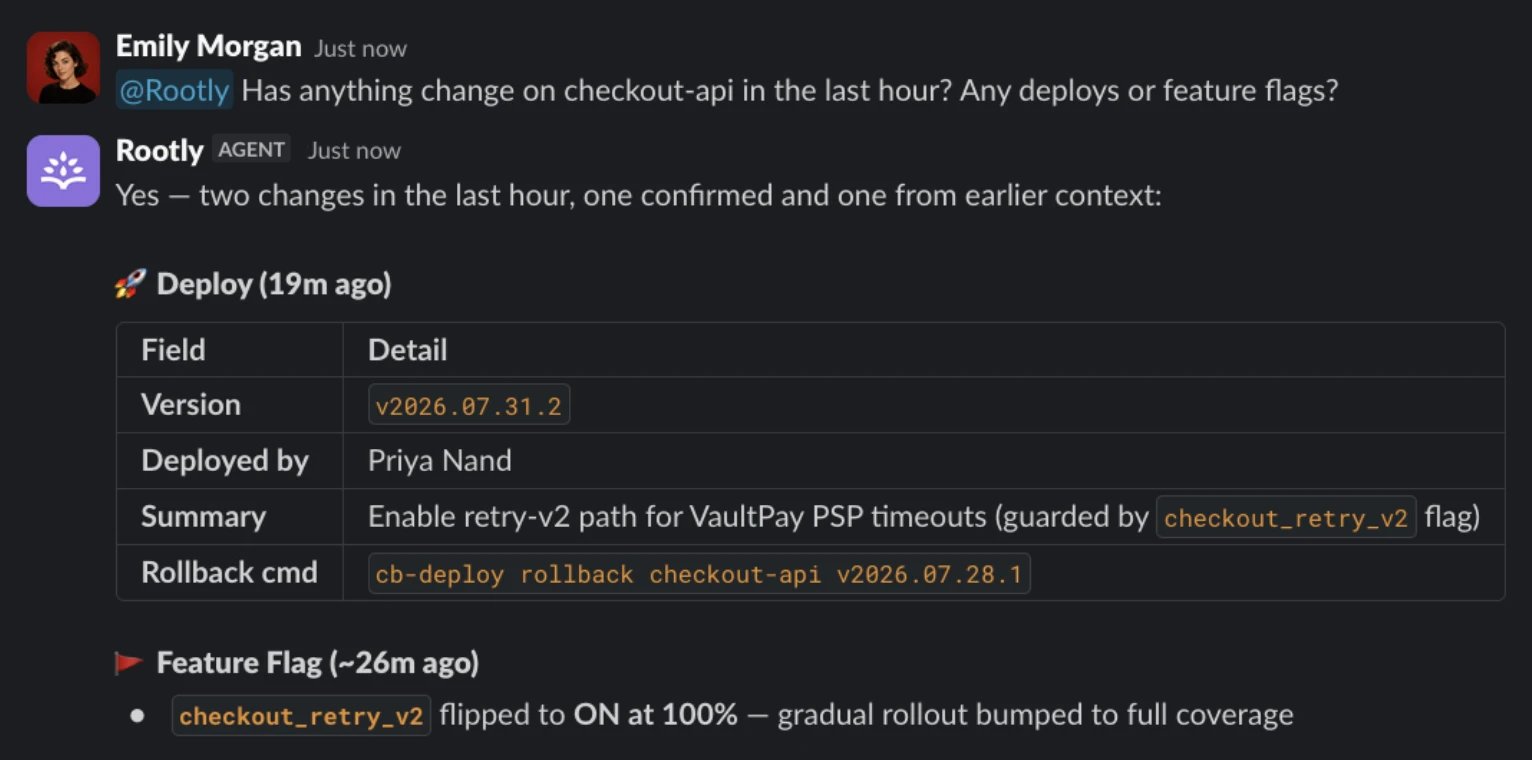 Answers like this one draw on your own tools through [Connectors](/ai/connectors/overview): plug in your observability, code, and docs sources and Rootly AI investigates with them.
[Private Agent](/private-agent) is an Early Preview for approved customers. When both Private Agent and AI SRE are enabled for the selected team, it lets Rootly AI reach services inside your network. Its capabilities follow your Rootly role and the agent's local policy, with a separate access boundary from SaaS connectors.
Setup takes one toggle and a Slack reconnect. See [Getting Started](/ai/rootly-in-slack/getting-started).
***
## How Rootly AI in Slack Works
Rootly AI reads from your Rootly data and the channel conversation, including bridge call transcripts when available, to answer questions and take actions on your behalf. Type `@Rootly` and ask. It uses the incident's live context to decide how to respond, and replies in-thread so the channel sees any action taken.
Rootly AI also answers in the Slack assistant pane and in DMs. Those surfaces cannot change Rootly records, but a connector can expose separately governed external actions. See [Using Rootly AI in Slack](/ai/rootly-in-slack/using-rootly-in-slack) for the full guide.
Model details, including failover behavior, are documented in [Data Privacy for Rootly AI](/ai/data-privacy-for-rootly-ai).
***
## Key Capabilities at a Glance
| Capability | What it does | Example ask |
| :- | :- | :- |
| Catch me up | Structured brief of the incident's state, key events, and open work | "@Rootly what's going on right now?" |
| Who's on call | Current and historical on-call lookups | "@Rootly who's on call for the Security team?" |
| Page responders | Pages a team, user, or escalation policy via Rootly On-Call | "@Rootly page the Search Experience team." |
| Update an incident | Changes severity, status, roles, and fields, confirming what it did | "@Rootly bump the severity to SEV2." |
| [Find related incidents](/ai/related-incidents) | Ranked matches from your own incident history | "@Rootly are there any related incidents involving this service?" |
| Draft customer updates | Slack-ready or status-page-ready update copy from current state | "@Rootly write a draft update for leadership and our partners." |
This table is a sample. The full prompt catalog lives in [What to Use Rootly AI For](/ai/rootly-in-slack/what-to-use-rootly-for).
***
## Who Can Use Rootly AI in Slack
Rootly AI in Slack requires an **Incident Response role**. Without one, Rootly AI asks you to contact your admin, and requests to page or check who is on call are refused.
***
## How Permissions Work
Rootly AI uses each user's existing Rootly permissions. If a user can't see a private incident in the web app, Rootly AI won't surface it for them in Slack. If a role doesn't allow paging, Rootly AI declines to page when that user asks.
Connector data and actions can add a separate access boundary. A connector guide identifies which users can use its tools and the provider account that scopes the available data and operations. For example, Devin repository reads use the connected service user's repository access, including for Slack AI users who cannot manage the connector.
Permissions are managed in **Configuration → Roles & Permissions**. There is no separate AI permission system.
***
## Frequently Asked Questions
Rootly AI has to be invited to a channel before it sees anything there or takes action. User permissions still apply on top.
Rootly AI's native paging action uses Rootly On-Call only and does not fall back to third-party paging integrations configured elsewhere in Rootly. A connector with an explicitly supported paging tool can define a separate permission boundary; see that connector's guide.
***
## Related Pages
Turn on Rootly AI in Slack and walk through your first interaction.
Where to invoke Rootly AI, how clarification cards work, and how actions run.
The full catalog of prompts, grouped by use case.
Common symptoms and how to resolve them.
This documentation is built and hosted on [Mintlify](https://mintlify.com), a developer documentation platform.
Answers like this one draw on your own tools through [Connectors](/ai/connectors/overview): plug in your observability, code, and docs sources and Rootly AI investigates with them.
[Private Agent](/private-agent) is an Early Preview for approved customers. When both Private Agent and AI SRE are enabled for the selected team, it lets Rootly AI reach services inside your network. Its capabilities follow your Rootly role and the agent's local policy, with a separate access boundary from SaaS connectors.
Setup takes one toggle and a Slack reconnect. See [Getting Started](/ai/rootly-in-slack/getting-started).
***
## How Rootly AI in Slack Works
Rootly AI reads from your Rootly data and the channel conversation, including bridge call transcripts when available, to answer questions and take actions on your behalf. Type `@Rootly` and ask. It uses the incident's live context to decide how to respond, and replies in-thread so the channel sees any action taken.
Rootly AI also answers in the Slack assistant pane and in DMs. Those surfaces cannot change Rootly records, but a connector can expose separately governed external actions. See [Using Rootly AI in Slack](/ai/rootly-in-slack/using-rootly-in-slack) for the full guide.
Model details, including failover behavior, are documented in [Data Privacy for Rootly AI](/ai/data-privacy-for-rootly-ai).
***
## Key Capabilities at a Glance
| Capability | What it does | Example ask |
| :- | :- | :- |
| Catch me up | Structured brief of the incident's state, key events, and open work | "@Rootly what's going on right now?" |
| Who's on call | Current and historical on-call lookups | "@Rootly who's on call for the Security team?" |
| Page responders | Pages a team, user, or escalation policy via Rootly On-Call | "@Rootly page the Search Experience team." |
| Update an incident | Changes severity, status, roles, and fields, confirming what it did | "@Rootly bump the severity to SEV2." |
| [Find related incidents](/ai/related-incidents) | Ranked matches from your own incident history | "@Rootly are there any related incidents involving this service?" |
| Draft customer updates | Slack-ready or status-page-ready update copy from current state | "@Rootly write a draft update for leadership and our partners." |
This table is a sample. The full prompt catalog lives in [What to Use Rootly AI For](/ai/rootly-in-slack/what-to-use-rootly-for).
***
## Who Can Use Rootly AI in Slack
Rootly AI in Slack requires an **Incident Response role**. Without one, Rootly AI asks you to contact your admin, and requests to page or check who is on call are refused.
***
## How Permissions Work
Rootly AI uses each user's existing Rootly permissions. If a user can't see a private incident in the web app, Rootly AI won't surface it for them in Slack. If a role doesn't allow paging, Rootly AI declines to page when that user asks.
Connector data and actions can add a separate access boundary. A connector guide identifies which users can use its tools and the provider account that scopes the available data and operations. For example, Devin repository reads use the connected service user's repository access, including for Slack AI users who cannot manage the connector.
Permissions are managed in **Configuration → Roles & Permissions**. There is no separate AI permission system.
***
## Frequently Asked Questions
Rootly AI has to be invited to a channel before it sees anything there or takes action. User permissions still apply on top.
Rootly AI's native paging action uses Rootly On-Call only and does not fall back to third-party paging integrations configured elsewhere in Rootly. A connector with an explicitly supported paging tool can define a separate permission boundary; see that connector's guide.
***
## Related Pages
Turn on Rootly AI in Slack and walk through your first interaction.
Where to invoke Rootly AI, how clarification cards work, and how actions run.
The full catalog of prompts, grouped by use case.
Common symptoms and how to resolve them.
This documentation is built and hosted on [Mintlify](https://mintlify.com), a developer documentation platform.